
If you've been building on Meta's platform and your app review keeps getting rejected with vague, unhelpful feedback — you're not alone. This happens to a lot of developers, and most of the time it comes down to a few fixable mistakes.
In this post I'm going to walk through what Meta app review actually is, why apps get disapproved, and exactly what we fixed to get PostMoore approved. Hopefully it saves you the back-and-forth we went through.
What Is Meta App Review (and Why Does It Even Matter)?
When you build an app that connects to Meta's platforms — Instagram, Facebook, — you need API access to do anything meaningful. Posting content, reading profile data, publishing on behalf of users — all of that goes through Meta's API.
But before Meta gives you access to those APIs, you have to pass something called App Review.
App Review is Meta's process for verifying that your app is using their APIs correctly and for legitimate purposes. They want to make sure you're actually using the permissions you're requesting, that real users can see what your app is doing with their data, and that the experience is clear and functional.
If your app doesn't pass, you lose access to those features entirely. For a product like PostMoore — a social media scheduling platform — no Instagram API approval means no Instagram publishing. It's that simple.
Why Most Apps Get Disapproved
There are a few patterns that show up over and over again. These are the ones that kept tripping us up.
Requesting Permissions You're Not Actually Using Yet
This is a big one. If your app review submission includes API permissions for features that aren't built yet — even if you're planning to add them later — Meta will likely reject it.
Meta needs to see the permission in use in your screen recording. If you request the analytics API but there's no analytics feature in your app to demonstrate, that's a red flag.
For PostMoore, we requested three permissions:
instagram_business_content_publish
instagram_basic
public_profile
Even though we have plans to add analytics in a future update, we did not request the analytics API. Keep it lean. Only request what you're actively using right now.
Incomplete User Experience in Your Screen Recording
This one catches a lot of people. Meta is explicit about this: if your screencast doesn't show the complete user experience, it won't pass.
That means you can't just jump straight to the permission being used. You need to show the full flow — from login, through account connection, all the way to the feature that requires that permission.
Poor Quality Video With No Annotations(Comments)
The reviewers watching your screen recording need to understand exactly what's happening and why a particular permission is necessary at each step. If they can't clearly see what's on screen, or if you're clicking around quickly without context, it's very easy for them to miss something.
Meta's reviewers are going through a lot of submissions. Make it easy for them.
What Actually Got PostMoore Approved
Here's the approach that finally worked for us, broken down step by step.
Record Slowly and be Intentional
Don't rush through the screen recording. Navigate through each part of the app slowly so the reviewer can follow along. Think of it like you're doing a demo for someone who has never seen your product before — because you are.
Annotate Every Permission in Context
At each point in the video where a specific permission is being used, add a visible annotation that names the permission and explains why it's needed there.
For example, when we hit the Instagram post publishing step, we added an annotation that said something like: "instagram_business_content_publish — used here to publish the scheduled post to the connected Instagram Business account."
This removes all confusion. The reviewer doesn't have to guess. You're showing them exactly where the permission lives in the app and what value it provides to the user.
Show the Full User Experience(UX)— Start to Finish
Our approved video covered the entire user journey:
Home page with the login button visible
Login with credentials
Instagram account connection screen (where the OAuth permissions dialog appears)
The permissions being granted by the user
Navigating to the "Create New Post" page
Going through every stage of the post creation flow
Annotations at each step showing which permission is active and why
At each major step, we called out the relevant permission and how it enabled that specific functionality.
Meta App review Video Demo
What the Rejection Looked Like Before We Fixed It
Before we made these changes, every single submission came back disapproved. And Meta's rejection messages? Vague doesn't even begin to cover it.
instagram_business_content_publish
Ready to grow your audience?
Join thousands of creators who trust PostMoore to manage their social media presence.
Start free trialScreencast Not Aligned with Use Case Details
Developer Policy 1.6 - Build a Trustworthy Product We have determined that your apps' use case is allowed, however, the submitted screencast fails to demonstrate the end-to-end experience of the use case described in the submission notes, hence the requested permission/feature is rejected.Please resolve this issue by sharing a new screencast that contains the end-to-end experience of the use case when you re-submit for App Review, including:
The complete Meta login flow;
A user granting app access to the permission/feature;
The end-to-end experience of the use case for the requested permission/feature;
Follow the best practices shared in the
, including: use English as the app UI language, provide captions and tool-tips, and explain the meaning of buttons and other UI elements; and
If your app is a server-to-server app OR your app is using system user token to access Meta API, please indicate it in your next submission so that we're aware that frontend Meta login authentication flow is not visible.
For more information, you can also view our App Review introduction video, and Permissions and Feature Reference for allowed usage, and Common rejection guidelines.
SCREENSHOT OF DISAPPROVED REVIEW APP
The feedback was generic enough to be almost useless. No clear reason, no specific flag, just a disapproval with a few boilerplate lines about policy. This is genuinely frustrating — and it's why most developers give up or keep submitting the same broken submission hoping for a different result.
The fix isn't to keep submitting the same video. It's to understand what the reviewers are actually looking for.
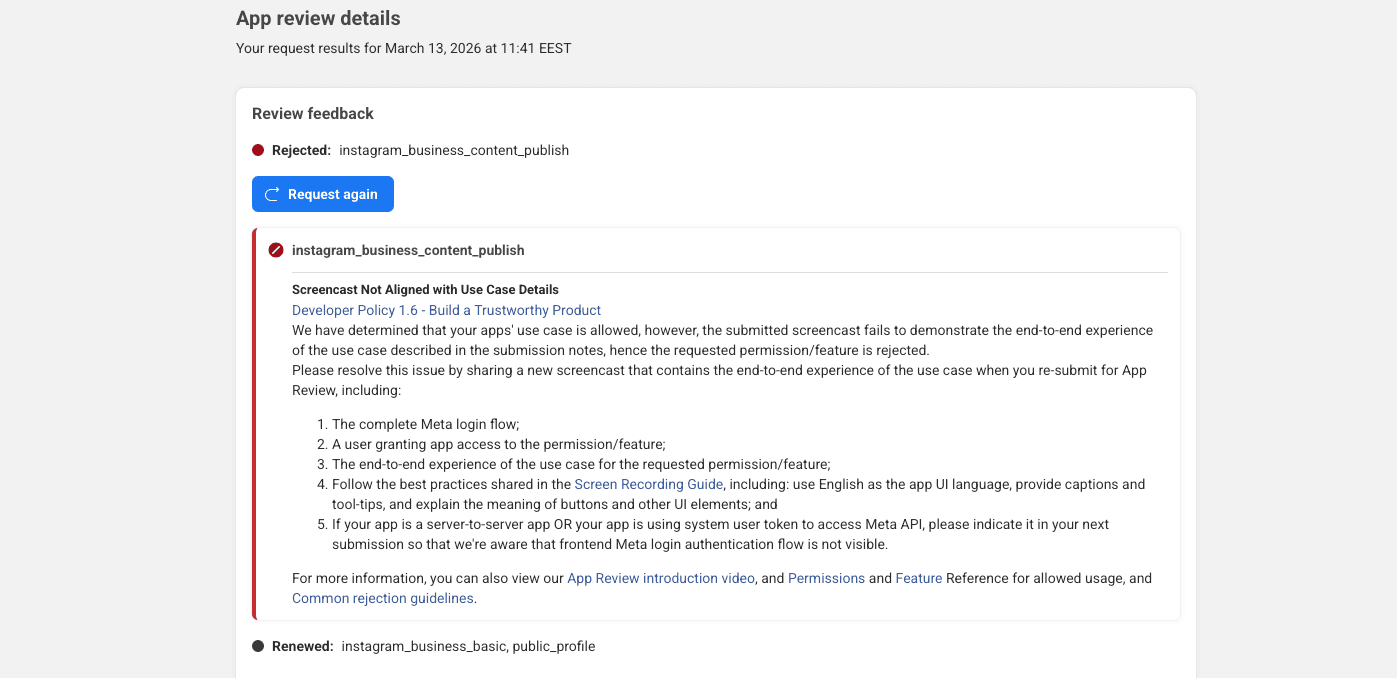
Vague Error Message by Meta for instagram_business_content_publish dated March 13, 2026 at 11:41 EEST
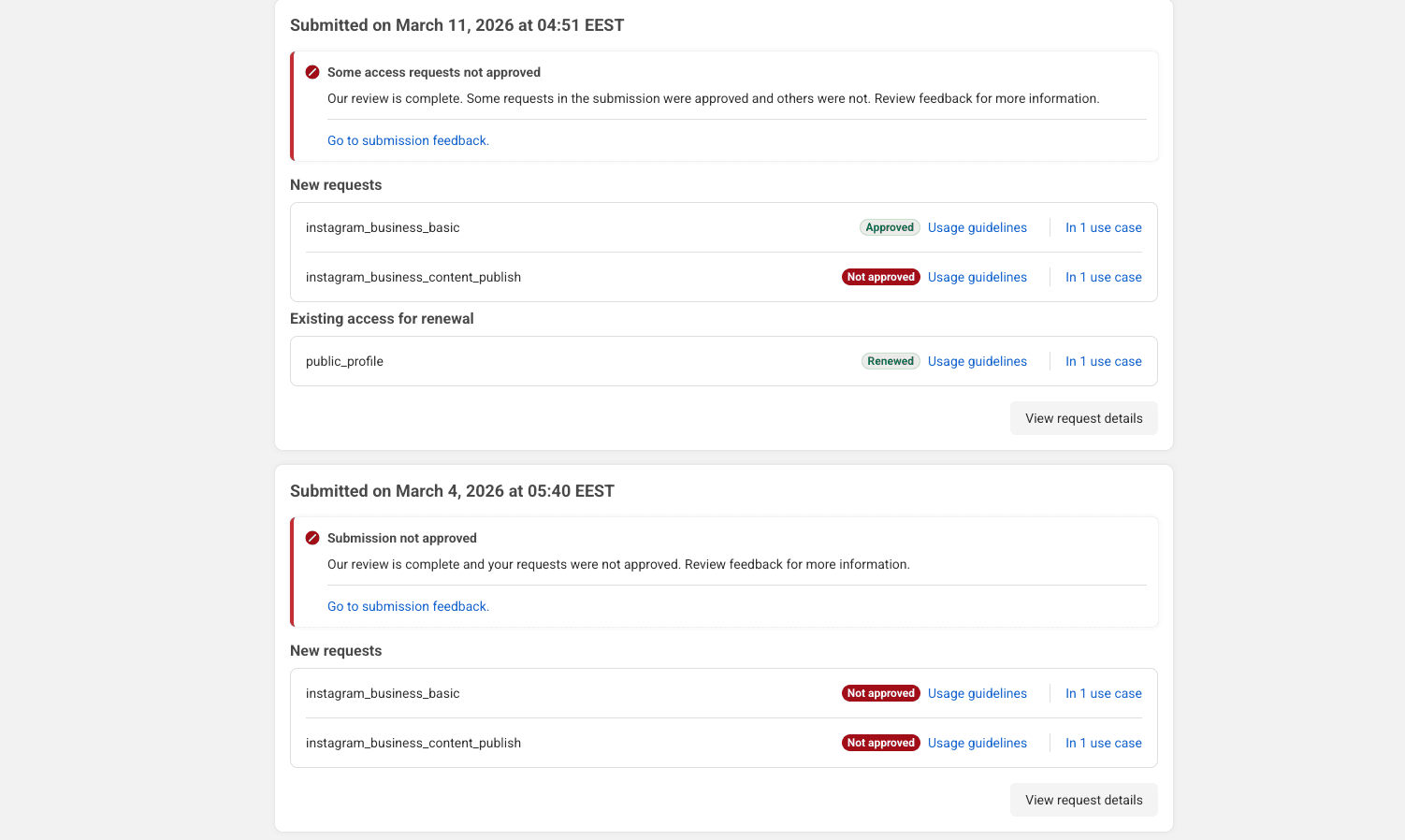
Submitted Permissions that were declined
After the Fix: What Approved Looks Like
Once we made all these changes — slow and clear recording, full UX walkthrough, annotated permissions at every step, and no unnecessary API requests — the review came back approved.
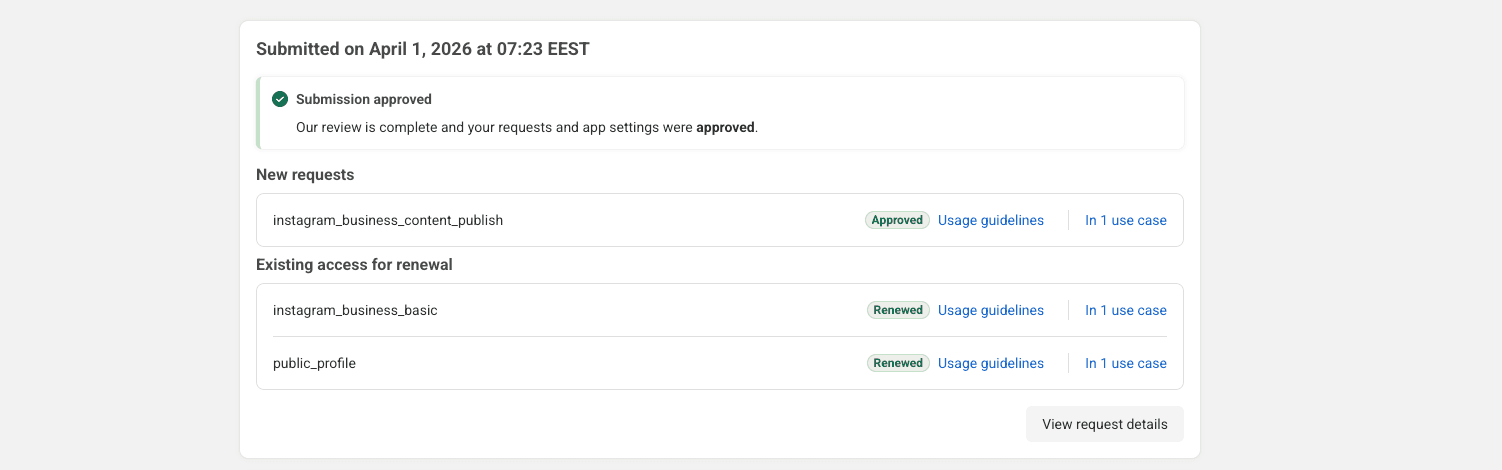
Meta App Review Approved Permissions dated April 1, 2026 at 07:23 EEST
Quick Reference: What to Do Before You Submit
Only request permissions your app currently uses
Record your full user experience from login to feature use
Add text annotations at every point a permission is in use
Record slowly — let reviewers follow every click
Keep your video quality clear (no blurry recordings)
Don't request APIs for future features
Don't rush through the recording
Don't skip the login or account connection steps Final Thought
Meta's app review process can feel like a black box — especially when you're getting rejected without clear feedback. But once you understand what the reviewers are actually evaluating, the path to approval gets a lot clearer.
The key is treating your screen recording like a product demo: show everything, annotate your permissions in context, and only ask for what you genuinely need right now.
If this helped you get unstuck, PostMoore is the scheduling platform we built through this whole process — go check it out at postmoo.re if you're managing content across multiple platforms.
Good luck — and build something great.
FAQ
Q: Can I request additional Meta permissions after my app is already approved?
Yes, but you'll need to go through app review again for each new permission. Plan your permission scope carefully per phase of your product.
Q: How long does Meta app review take?
It varies as you saw from our screenshots, but typically 5–7 business days. If you're rejected and resubmit quickly with fixes, subsequent reviews can sometimes be faster.
Q: Do I need a business account to apply for Instagram API access?
Yes. The instagram_business_content_publish permission requires the user to have a connected Instagram Business or Creator account.
Q: What screen recording tool should I use?
Any tool that captures clearly at full resolution works, we used in built mac screen recorder, type Shift+CTRL+5 and converted the video from .MOV to MP4 with Postmoore freee Video Converter and added the annotations with Davinci but can be done with Capcut or any video Editor You are comfortable with. Other screen recorders are Loom, OBS, or QuickTime on Mac. What matters is the quality and the annotations, not the tool.
Q:What if Meta still rejects with vague feedback?
Review Meta's screen Recording guide, and the video from Postmoore compare your video against each checklist item, and you will be able to see notice the gap.